
Parquet: What floor are we standing on?
Peter Hicks
This is the boring server rendered SEO version of this article. If you're a robot, please keep reading. The interactive version of this is at /parquet.
At oleander, we manage a large number of Iceberg catalogs, which are at their essence manifests of Parquet files (There is also a catalog, I guess). So for us, the order of units from simplest to most complex follows this pattern.
S3 <-- Parquet <-- Iceberg <-- Query engines (Spark, DuckDB, Polars & Bloom) <-- Observability via OpenLineage.We've talked about many of these parts in detail, and even wrote a 17 part Spark & Iceberg tutorial series so that you all dear readers can dump it in your LLMs, and call it "skills". I won't talk about object storage (S3, R2, GCS) which is the ultimate panacea for all woes of the realm because I cannot solve all the problems of the world in a single blog post, but we will discuss Parquet in detail.
What's in a name
When Julien and others in the committee, I presume, named Parquet, they came up with the magnum opus of software names in an industry with horrible precedents and successors. I first worked on the mighty JES2 (Job Entry Subsystem... 2), just about the first non OS related program the IBM zOS mainframe boots to schedule tasks. There was also the JES3 (Job Entry Subsystem... 3) whose team was across from us in the Eero Saarinen designed panopticon that had a centralized scheduler instead of being entirely distributed. There was never a mention of JES or JES1, and sometimes I have a fleeting thought about whatever happened to that project. At present, I need to regrettably speak of ChatGPT & Kubernetes each and every day, so very little has improved. Many before Julien must have looked towards the heavens for the divine inspiration required to name your then humble project, but he must have looked in the opposite direction towards the slatted floorboards that he stood on and saw the row groups and column chunks right beneath him.
Each band is one row group and each tile one column chunk, sized by its share of the row group's compressed bytes. Hover a tile for details.
What's in a file
Well that's easy, in the case of Parquet...
[PAR1 in ascii] [PAR1 in ascii][ 50 41 52 31 ] ...everything else... [ 50 41 52 31 ]Now that we understand this, everything else is easy. So let's talk about the repeating concept that comes just after the first 4 glorious bytes (PAR1) that starts our file. What comes next are 1 to many row groups, so now we can update our frame of the realm. I'll use the regex + to denote 1 or more.
[PAR1 in ascii] [PAR1 in ascii][ 50 41 52 31 ] [Row Group]+ everything else... [ 50 41 52 31 ][Row group 1]
id column chunk: data page: [1, 2, 3]
name column chunk: data page: ["Alfred", "Ethan", "Joel"]
age column chunk: data page: [127, 68, 71] optional Bloom filter: <bitset>
city column chunk: dictionary page: ["London", "LA"] data page: [0, 1, 1][Row group n]...One important thing to note is that the values for each column are stored next to each other, which is what people mean when they say that Parquet is columnar. This also gives us a basis to understand what columnar oriented systems are good at against where they will underperform a transactional RDBMS like Postgres.
Analytical systems backed by Parquet are excellent with aggregations like this since they can read only the required columns, skip irrelevant row groups, and process row groups in parallel or distribute them across a compute engine like Spark.
SELECT city, AVG(age)FROM directorsGROUP BY city;Since Parquet doesn’t provide a general-purpose row index like a Postgres B-tree, we don't really know which row group to look for this value in for a pointed SELECT statement. Row groups do have min and max values defined in the footer (we will discuss later), but we could possibly need to search multiple row groups to find this value since row groups may or may not be ordered.
SELECT *FROM directorsWHERE id = 42;Low cardinality type data like city can be mapped to a dictionary as a means of compression to only store a single version of the actual data via a dictionary page as shown above.
Along with our column chunks, we can also imbue bloom filters which are good for high cardinality since they can tell us for certain if a value does not exist in a space efficient data structure, great for predicate pushdown and excluding entire row groups for filters if we can be 100% certain a value does not exist.
The end is the beginning
The footer of a Parquet file is actually where you read to get all the requisite offsets to know where to go, a table of contents of sorts that contains the compression types, column names and offsets one needs to get to the right places. Min, max, and nulls all provide the means to skip entire chucks when querying results.
[PAR1 in ascii] [PAR1 in ascii][ 50 41 52 31 ] [Row Group]+ [Footer] [Footer length] [ 50 41 52 31 ][Footer]
schema: id: INT64 name: STRING age: INT32 city: STRING
total rows: 3
row groups: row group 1: rows: 3
id column chunk: location: <byte offset> codec: ZSTD encodings: PLAIN compressed size: <bytes> uncompressed size: <bytes> statistics: min: 1 max: 3 null count: 0
name column chunk: location: <byte offset> codec: ZSTD encodings: PLAIN compressed size: <bytes> uncompressed size: <bytes> statistics: min: "Alfred" max: "Joel" null count: 0
age column chunk: location: <byte offset> codec: ZSTD encodings: PLAIN compressed size: <bytes> uncompressed size: <bytes> statistics: min: 68 max: 127 null count: 0
city column chunk: dictionary-page location: <byte offset> data-page location: <byte offset> codec: ZSTD encodings: - dictionary - RLE compressed size: <bytes> uncompressed size: <bytes> statistics: min: "LA" max: "London" null count: 0
created by: DuckDB version 1.5.1The real end
The real end of a Parquet file is this 8 byte sequence like this:
f3 02 00 00 50 41 52 31We already discussed that 50 41 52 31 maps to PAR1 so that leaves us with the following that translates to:
Bytes in file: f3 02 00 00Reverse: 00 00 02 f3 # little endian, which I cannot read, so I'm reversing itBinary: 00000000 00000000 00000010 11110011Decimal: 755This informs us that the footer length for this file is 755 bytes, giving us a place to start from the bottom, so the end really is the beginning.
Learning by doing
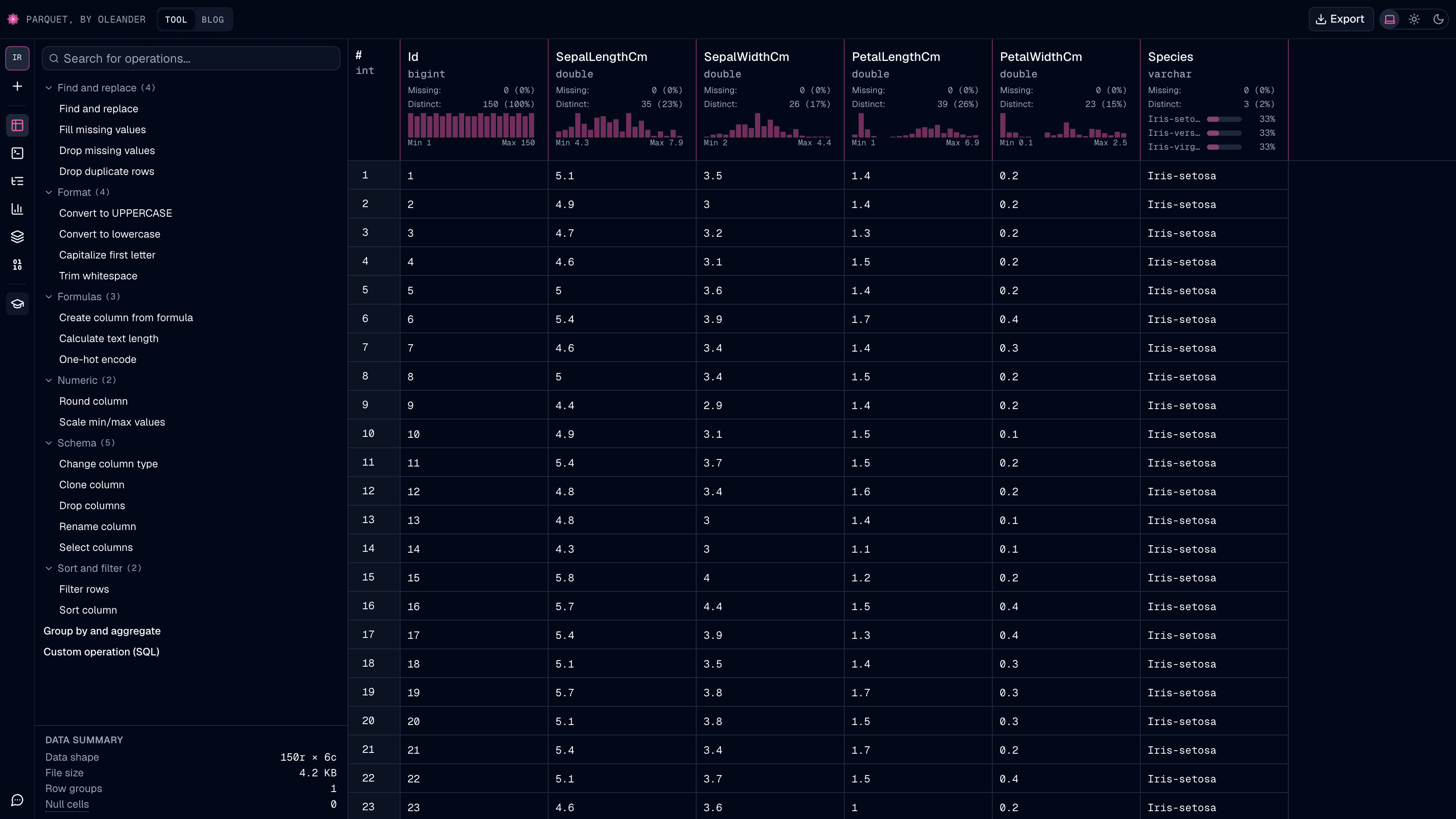
Since the best way to learn (at least for me) is to do, we crafted a free online Parquet tool and viewer to explore & manipulate Parquet files. Using it, you can both learn and export updates to Parquet files.
Credits
Many of the ideas here come from Microsoft's Data Wrangler VSCode extension. (I neglected to include VS Code in the list of bad names) The extension, from what I can tell, uses many standard python libs like pandas and Jupyter to work while our tool makes use of DuckDB WebAssembly since I'm better with SQL than python to be honest. I refreshed my memory about bloom filters with Thomas Hurst's Bloom Filter Calculator. I used some Gen AI tooling for unit tests and merging disparate parts of oleander together to form this tool.
 Open the Parquet toolWrangle, query, and inspect your own files. Nothing leaves your browser.